Senior Editor: Alan Agbele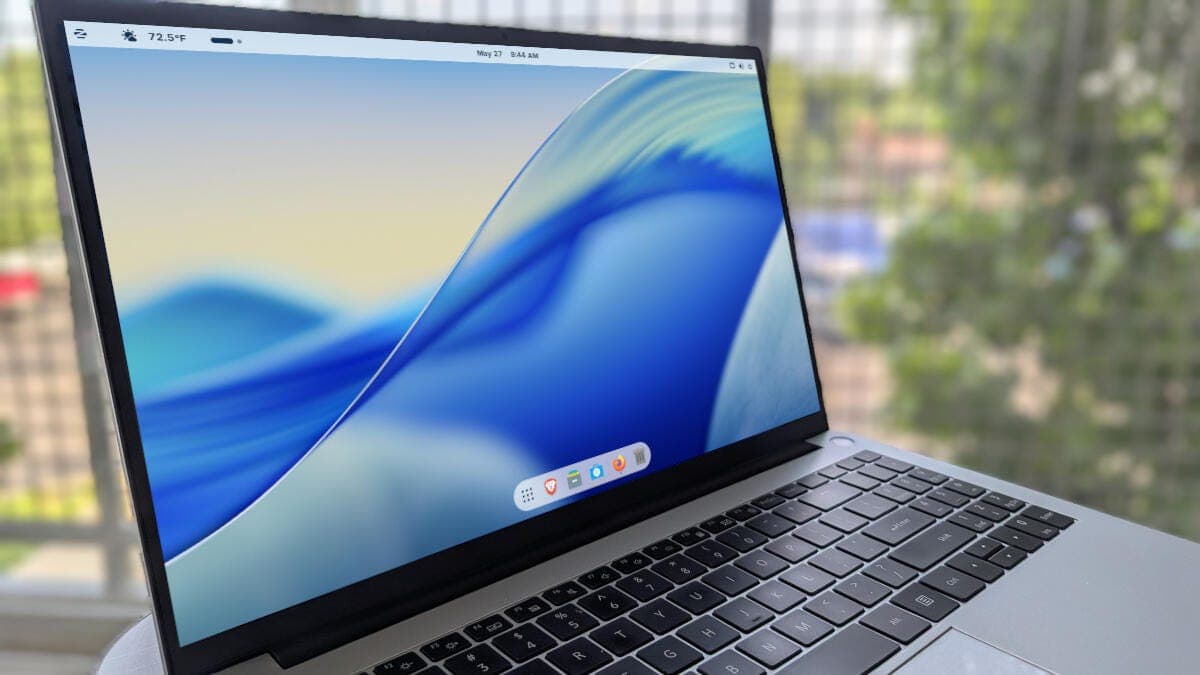
Linux users who admire MacOS's clean interface can now replicate it without switching operating systems, thanks to ZorinOS and its built-in customization tools. For users looking to migrate from Apple's ecosystem, ZorinOS provides a free path to a familiar desktop experience without the need for complex configuration.
The MacOS Look on Linux
ZorinOS, a Linux distribution based on Ubuntu, focuses on making the transition from other operating systems as smooth as possible. One of its standout features is the ability to transform the desktop into a near replica of MacOS. The distribution includes a suite of tools that let users adjust the dock, menu bar, and window controls to mirror Apple's design language.
This approach appeals to users who want the flexibility and open-source nature of Linux but prefer the visual consistency of MacOS. By offering a familiar interface, ZorinOS reduces the learning curve for newcomers while maintaining the underlying power of Linux.
What You Need to Know
How ZorinOS Bridges the Gap
ZorinOS achieves the MacOS look through a combination of pre installed themes and configuration options. Users do not need to edit system files or install third party software. The Zorin Appearance app offers a single-click solution for switching between layouts, including a MacOS inspired theme.
Key adjustments include moving the application dock to the bottom of the screen, adding a trash can icon, and repositioning the window buttons to the left side. These changes, along with a custom icon set, create a visual experience that closely resembles MacOS.
Why This Matters
This development matters because it lowers the barrier for MacOS users to try Linux, potentially expanding the Linux user base and challenging the dominance of proprietary desktop operating systems. It also highlights the trend of Linux distributions focusing on user experience and design, making open source alternatives more accessible to mainstream audiences. For enterprises and individuals looking to reduce software costs while maintaining a premium interface, ZorinOS represents a viable option.
As more users seek privacy conscious and cost effective computing, distributions like ZorinOS demonstrate that powerful open source tools can coexist with polished design. The ability to replicate MacOS's aesthetic without licensing fees or hardware lock in gives users more freedom in their computing choices.