Senior Editor: Alan Agbele
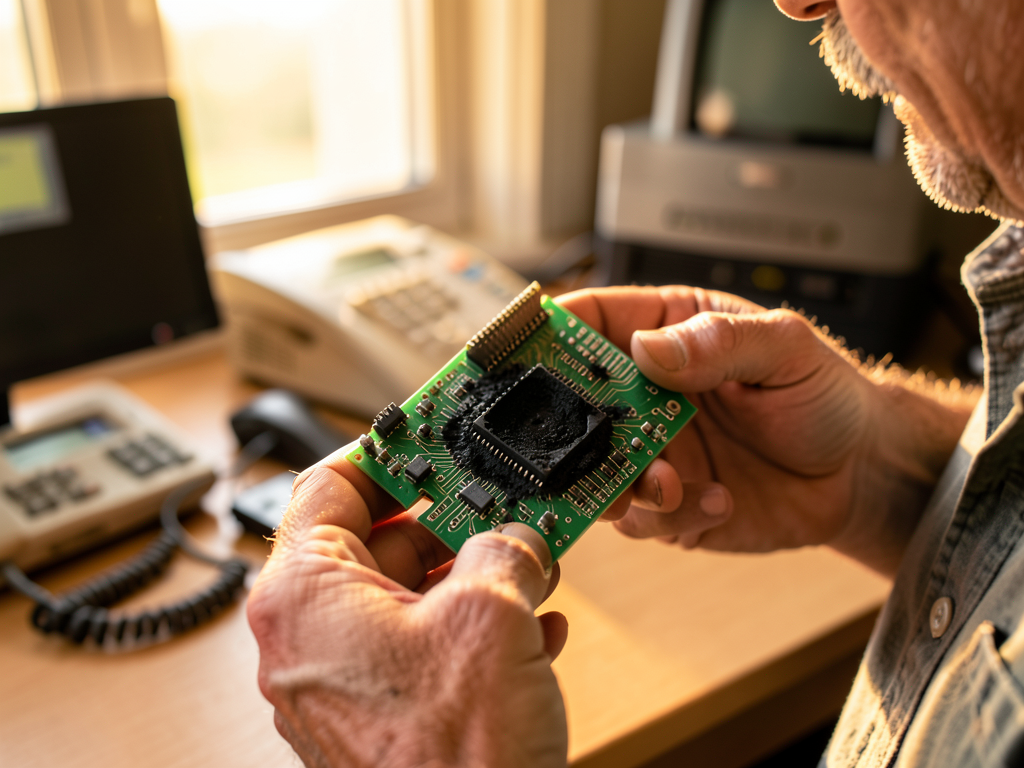
A modem that Windows Device Manager declared healthy had already been destroyed by a lightning strike, according to a reader account published in The Register's On Call column. The case, shared by a support technician identified as Lachlan, exposes a persistent gap between what software diagnostics report and what is physically happening inside a PC.
The Diagnostic That Passed a Dead Modem
Lachlan's first assumption was reasonable. The executive could neither send nor receive email, and in the dialup age that usually pointed to a misbehaving modem. He checked network settings and found nothing wrong. He inspected the cables and confirmed the phone line had a dial tone.
He then turned to Windows Device Manager, where an advanced option let him send a series of low-level AT commands to the modem and read the responses. The tests came back clean. Windows reported the modem was in perfect health.
Only when Lachlan opened the PC did the real problem appear. A faint smell of scorched circuit board led him to a black soot mark shaped like the voltage regulator chip. The component had been vaporized.
Why a Lightning Strike Beat the Software Check
The regulator chip exists to protect the modem from the roughly 70V line voltage BT used to create a phone connection. In this case, the surge was far higher than a slight overvoltage. The chip sacrificed itself, and the damage stayed hidden behind a case that looked normal from the outside.
The executive's answer confirmed the cause. His email had stopped working while he watched an impressive display of lightning. The timeline matched the hardware failure exactly.
This is the core lesson of the story. Software diagnostics verify behavior, not condition. A component can respond to commands while already compromised, which is why experienced technicians treat a clean test as one data point rather than a verdict.
What the Case Reveals About Modern Device Health
The dialup era is gone, but the underlying problem has not disappeared. Modern laptops and desktops ship with firmware-level health reporting, thermal sensors and vendor diagnostic suites. Those tools, however, still rely on components answering queries. A failed capacitor, a damaged power delivery stage or a degraded connection can remain invisible until someone opens the chassis.
For support teams, the practical takeaway is a layered approach. The On Call account suggests a simple escalation order:
Lachlan's story also highlights a cultural point about troubleshooting. The technician did not stop at the first clean result. He kept asking why a working modem would fail to move email, and that curiosity led him to the soot mark.
Why This Matters
Users and IT teams increasingly trust dashboards and automated health reports to tell them whether hardware is sound. This case shows the limits of that trust. A device that passes every software test can still be physically damaged, and the cost of missing that damage ranges from wasted replacement parts to data loss or safety risk.
Hardware vendors face a related pressure. As diagnostic suites become selling points, the gap between reported health and actual condition becomes a reputational issue. Support organizations that train staff to combine software results with physical evidence will resolve cases faster and avoid the trap of replacing the wrong component.
The broader lesson extends beyond modems. Any system that reports its own status, from a laptop to an industrial controller, can only report what its surviving circuitry allows. The scorched chip in Lachlan's story is a reminder that the most reliable diagnostic tool is sometimes a technician's nose.