Editor: Porcia Akua Holmes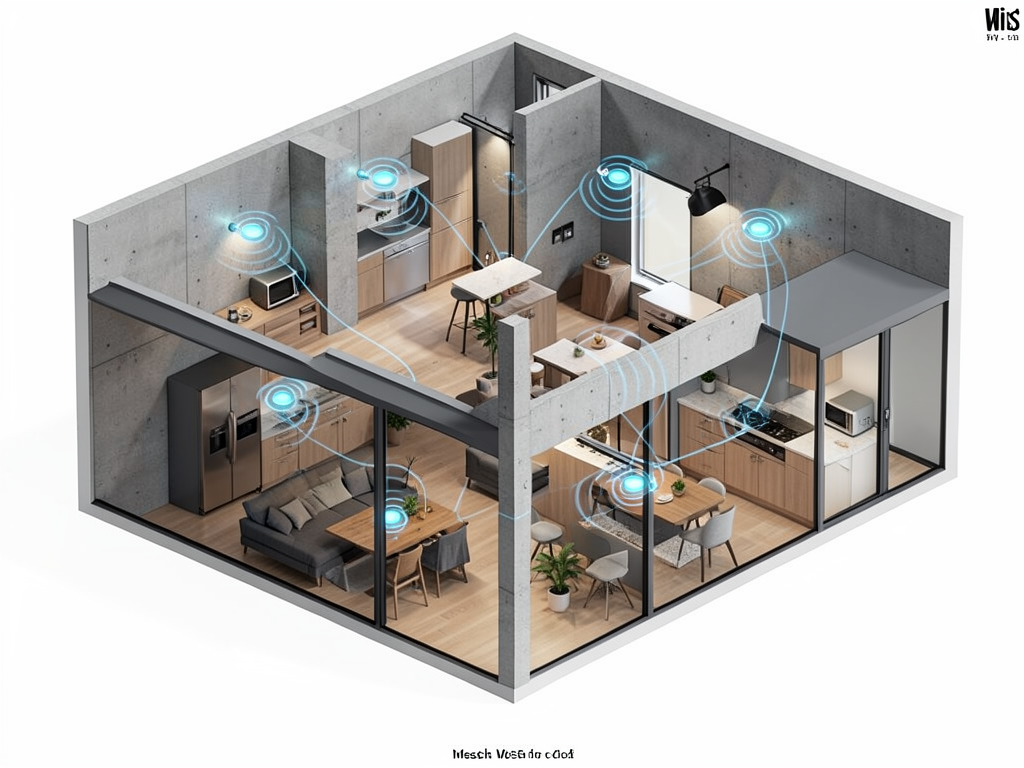
When shoppers ask about “The Maximum Coverage Range For Mesh Wi,” they are looking for practical limits on eliminating dead zones. Manufacturers often promise 5,000 to 6,000 square feet of coverage, but real-world performance depends heavily on home layout, construction materials and the number of nodes installed.
How Mesh Systems Define Coverage Range
A mesh network’s coverage is cumulative: each node adds a zone of reliable signal. However, the range between the primary router and each satellite node is limited. Most nodes must stay within 50 to 80 feet of the main unit to maintain strong backhaul, especially in dual-band systems. Tri-band and Wi-Fi 6E models can stretch that distance by using a dedicated wireless channel for node-to-node communication.
Walls, floors and large appliances absorb and reflect radio waves, cutting effective range by 25% to 50% in many homes. Concrete, brick and metal studs cause the most attenuation. Open floor plans with drywall partitions allow mesh systems to perform closer to their advertised numbers. Mesh Wi-Fi coverage also degrades when too many nodes are crowded together, as overlapping signals create interference instead of improving reach.
Why This Matters
As smart homes fill with streaming devices, security cameras and IoT sensors, a single router often cannot deliver consistent connectivity across the entire house. Mesh Wi systems have become the standard solution for homes over 2,000 square feet. The maximum coverage range directly affects purchase decisions: buying a system that claims 6,000 square feet but installs it in a 2,500-square-foot ranch home with plaster walls may still result in dead zones. Consumers who underestimate real-world range end up buying extra nodes they do not need or suffering slow speeds due to poor node placement. The shift to Wi-Fi 6 and 6E will improve backhaul efficiency, but physical limits remain.
Maximizing Your Mesh Coverage
To get the most from a mesh system, place the primary router near the center of the home and add nodes in rooms that experience the weakest signal. Keep nodes at least 10 feet apart to avoid interference but within 60 feet of the main unit for optimal backhaul. Use the mesh app to check firmware updates and adjust channels if neighbors’ networks crowd the airwaves. Hardwiring nodes via Ethernet or MoCA adapters eliminates wireless backhaul limits and pushes coverage closer to the manufacturer’s maximum. For most households, three nodes properly positioned will cover a 4,000-square-foot space with usable speeds.